


If you are driving a vehicle in India, it is mandatory to have important documents such as the vehicle registration certificate and a valid driving licence. As the government has been focusing on digital services, the Regional Transport Offices (RTOs) across the country have also been digistised. The Parivahan Sewa Portal was introduced by the Ministry of Road Transport and Highways (MoRTH) to automate all vehicle registration and driving licence-related activities and create national-level and state-level registers of vehicles or DL information.
The Road Transport Ministry has introduced two software applications – VAHAN for Vehicle Registration and SARATHI for Driving Licenses (DL). These applications have been centralised as part of the latest initiative.
Here’s all you need to know about the m Parivahan app and Parivahan.gov.in portal.
see also: Know about Parivahan Delhi
mParivahan: Parivahan Sewa app download
Citizens can download the mParivahan App on their mobile phones from Google Play store or Apple store and access DL and RC services. The mParivahan Sewa mobile application is available in different languages such as English, Hindi and Marathi.
The NextGen mParivahan application has been developed by the National Informatics Centre (NIC) under the Ministry of Electronics and Information Technology (MeitY), Government of India. The app provides three language options namely English, Hindi, and Marathi.
See also: What is an Eway bill login
The mParivahan app can be used for licence registration, getting vehicle details, paying road tax, all India RTO vehicle registration number search, registering complaints, etc. The vehicle registration facility in the app provides details about insurance validity, vehicle fitness validity and PUC certificate. The application helps citizens get instant access to transport office-related services and information. Some noteworthy features include Virtual RC or DL, Encrypted QR Code, Information Services, DL or RC search, Transport Notification, RTO/Traffic Office Locations.
know about: hp sarathi parivahan
mParivahan features and benefits
- The application provides a user-friendly interface, accessible by iOS and Android users, and provides the convenience of availing various services without visiting any RTO.
- During checking by the traffic police officers, one need not produce physical documents of the vehicle. Vehicle owners can show their digital driving licence (DL) or registration certificate (RC).
- One can apply for a driving license (DL) and Vehicle Registration Certificate (RC) that are valid and accepted everywhere.
- One can get a new DL by clearing a mock test.
- Users can also locate the nearest RTO using the app.
- One can get vehicle details using the vehicle registration number. This way, one can obtain information about any vehicle registered in India through this application.
- Vehicle owners can get details related to any theft, loss, accident, parking tickets, etc. by entering the vehicle registration number on the portal.
- Details such as towed vehicle, car verification and second-hand vehicle verification can be obtained.
- Users can activate alerts and notifications for accidents through the app.
see also about: parivahan punjab
mParivahan app: How to register and sign in?
- Go to the Play store and download the official mparivahan app by NIC eGov
- Open the app after installation. If you are a new user, first sign up by entering your mobile number. An OTP will be sent to your number.
- Enter the OTP and click on ‘Verify’.
After sign up, click on the sign in option on the left side of the application. Enter your mobile number and then the OTP in the required fields to log into the mparivahan app.
see also about: parivahan haryana
Parivahan Sewa portal online services
The www.parivahan.gov.in portal offers the following services:
- Vehicle-related services through the Vaahan Parivahan Sewa website such as renewal of registration, issue of duplicate RC, etc.
- Driving license-related services through the Sarathi Parivahan.gov.in website, including applying for DL, renewal of DL, issue of duplicate DL, etc.
- Checkpost tax for vehicle tax collection at checkpost
- Fancy number booking
- National register or NR services
- Homologation
- National permit authorisation
- AITP (All India Tourist Permit) authorisation
- SLD (Speed Limiting Device) maker
- CNG (Compressed natural gas) maker through CNG Vahan Sewa portal
- VLTD (Vehicle Location Tracking Device) maker through vahan.parivahan.gov.in portal
- PUCC (Pollution Under Control Certificate)
- Trade certificate
- Vahan Green Sewa
- Vehicle recall
The pariwahan gov in website also provides informational services that users can access to know their license details, vehicle details, registration, permits, act, rules and policies, notifications and forms, etc. Users can also access various downloadable forms available online. Users can also get information on various rules, acts and policies such as the Motor Vehicles Act 1988, Central Motor Vehicles Rules 1989, Carriage by Road Act and Rules, Central Road Fund Act and Rules.
The Parivahan Sewa portal provides driving license-related services including:
- Permanent licence
- Renewal
- Duplicate licence
- Addition of class
- International driving permit
- Licencing related fees and charges
- Sample LL Question Bank
About Registration
You can get registration information on the portal such as:\
- Temporary registration
- Permanent registration
- Renewal of RC
- Duplicate RC
- No Objection Certificate (NOC)
- Address change
- HP endorsement
- HP termination
- Reassignment
- Trade certificate
- Issue of duplicate trade certificate
- Diplomatic vehicles
- Ownership transfer
- Registration display
About permits
Click on about permits link and get details about:
- Contact carriage
- Permit fees and permit period
all about: parivahan tamilnadu
mParivahan app: How to download driving license and RC copy?
- Download the mParivahan app on your phone. Go to the online services tab. Click on Driving license related services.
- Choose the state name to view the services.
- Tap the option to apply for DL and submit the required details. Make sure you have a learner’s license.
- Enter the learner’s license number and DL or Registration number of vehicle.
- Verify your DOB.
- The details will be displayed on the page and download it for future reference.
Parivahan Sewa driving licence application fee
| License type | Application fees |
| Learner’s Driving licence | Rs 200 |
| Renewal of Learner DL | Rs 200 |
| New driving licence | Rs 200 |
| Driver licence test fee | Rs 300 |
| Driver licence renewal | Rs 200 |
| Driving school licence fee/renewal | Rs 10,000 |
| Driving licence Renewal | Rs 200 |
| Any Appeal against RTO | Rs 200 |
| Duplicate driving school licence | Rs 5,000 |
know about: parivahan gujarat
Sarthi Parivahan Sewa license eligibility criteria
| License type | Eligibility |
| Motorcycle without gear | Minimum age of 16 years. The consent of parents or guardian is required, if an individual is less than 18 years of age |
| MCW (Motorcycle with Gear) | Applicant should be 18 years of age |
| Commercial license for transportation | Applicant should be 18 years of age and hold an LMV license |
Citizens can apply for various licenses through the Parivahan Sewa portal based on specified eligibility criteria.
Parivahan Sewa road tax payment
Vehicle owners who have purchased a vehicle for personal or commercial use, are required to pay road tax. The taxes collected by the government are utilised for the maintenance of the roads. In India, commercial vehicle owners must pay other state vehicle taxes at the check posts when entering other states. The parivahan.gov.in/parivahan/ portal enables vehicle owners to pay their Check Post Tax online through a simplified process explained below:
Step 1: Go to the official parivahan.gov.in website. On the home page, click on ‘Check Post Tax’ option given under the ‘Online Services’ section.


Step 2: A new page will open. Now, click on ‘Tax Payment’ option.


Step 3: Now, select the name of the state you are visiting and the ‘service name’ from the dropdown. Click on ‘Go’.


Step 4: The ‘Border Tax Payment’ application page will be displayed on the computer screen. Provide th vehicle number and click on ‘Get Details’. Some fields will be auto-filled.


Step 5: Provide the remaining details. Then, click on ‘Calculate Tax’ or ‘Pay Tax’ to pay the calculated tax amount.
Step 6: You will be directed to the payment gateway. Select the payment gateway and click on ‘Continue’.
Step 7: After the tax payment, you will be redirected to the ‘Checkpost’ page. You will get the receipt that can be printed and saved for future reference.
See also: All about Bharatmala project
Vahan Parivahan online payment of vehicle tax
To pay vehicle tax online, follow the steps given below:
Step 1: Go to the link vahan.parivahan.gov.in/vahaneservice/. Register on the portal with your e-mail ID and mobile number. Then, log in to the portal.


Step 2: Click on ‘Pay Vehicle Tax’ under ‘Online Services’
Step 3: Provide details like Registration Number and Chassis Number. Click on ‘Generate OTP’. Then, enter the OTP you would receive on your registered mobile number. Click on ‘Submit’.
Step 4: In the next step, select ‘Tax Mode’.
Step 5: Provide the ‘Permit Details’ (if applicable).
Step 6: The total payable amount will appear on the screen. Click on ‘Submit’. Then, click ‘Confirm payment’.
Step 7: Choose your payment gateway and accept the terms and conditions. Click on ‘Continue’.
Parivahan Sewa e challan
The Parivahan Sewa website enables users to check the status of their challan online. A challan is issued to a vehicle driver in a situation when the person may intentionally or unintentionally violate traffic rules. Through the E challan Parivahan service, one can check their traffic violation status under the Motor Vehicle (MV) Act through the online parivahan gov in portal.
Step 1: Visit the eChallan System on the Parivahan portal. You will be directed to the E challan parivahan website. Click on ‘Check Challan Status’ under the ‘Check Online Services’ section.


Step 2: Now, enter the challan details by selecting one of the options given – Challan Number, Vehicle Number and DL Number. Submit the Captcha code and click on ‘Get Detail’. The E Challan and the payment details will be displayed on the screen.


Parivahan Sewa online challan payment
One can pay their challan or fines issued to them through the official Parivahan Sewa portal online. You can go to the E challan Parivahan website and click on ‘Check Challan Status’ under the ‘Check Online Services’ section.
Provide the details through one of the options – Challan Number, Vehicle Number or DL Number. Submit the captcha code and click on ‘Get Detail’.
Your e challan status under the challan status row will be displayed. Now, click on ‘Pay Now’ given in the payment column. Select the payment mode and make the payment. You will receive a confirmation message and transaction ID on your registered mobile number.
Parivahan Sewa DL application status check online
You can visit the Parivahan Sewa to know the Driving License (DL) application status after you have completed the DL test and the DL license procedure. Here’s a step by step guide.
Step 1: On the home page, click on ‘Driving License Related Services’ under ‘Online Services’.


Step 2: You will be redirected to the sarathi.parivahan.gov.in website. The main page of the respective state transport department will be displayed. Select ‘Application Status’ on the top right corner of the page.


Step 3: On the next page, enter details such as the application number, date of birth and captcha code. Click on ‘Submit’ to view the DL application status.


Parivahan Sewa RC status check online
The Parivahan Sewa Vehicle Related services include the option to check the Vehicle Registration Certificate (RC) status online. Users can follow the procedure explained below:
Step 1: Go to Parivahan gov in portal for RC status check. Click on ‘Vehicle Related Services’ under ‘Online Services’.


Step 2: A new page will open. Select the state from the dropdown menu.


Step 3: Click on ‘Vehicle Registration Number’. Provide the vehicle registration number. Then, select the ‘State RTO’ from the dropdown and click on the ‘Proceed’.


Step 4: Click on ‘Status’ option. Then, click on ‘Know Your Application Status’.
Step 5: Provide the RC application number in ‘Application Number’. Enter the Captcha code. Then, click on ‘Submit’ and then on ‘View Report’. The Parivahan gov in screen will display the RC status.
Also read all about e way bill login
Parivahan Sewa slot booking
The official Parivahan Sewa portal also provides the facility to book a slot online for the DL test. Applicants should follow the procedure explained below:
Step 1: On the homepage, click on ‘Driving License Related Services’ under ‘Online Services’.
Step 2: Select the state from the dropdown.


Step 3: You will be directed to the transport department page. Select the ‘DL Test Slot Booking’ option under ‘Appointments’.


Step 4: On the next page, enter application details through one of the two options – Application Number or Learner License Number. Provide the application number or learner license number, applicant’s date of birth, and verification code. Click on the ‘Submit’.


Then, you can book the slot for the DL test by selecting the preferred date and time.
Parivahan Sewa: How to apply for driving license online?
- Go to the official website of the Ministry of Road Transport and Highways parivahan.gov.in/parivahan/ and click on ‘Driving License Related Services’ under Online Services.
- You will be directed to a new page on the sarathi parivahan gov in website. Select the state from the dropdown.


- Choose the type of driving license you wish to apply for.


- Complete the application form by providing relevant details and uploading the required documents. After completing the application form as per the instructions given, click on submit to proceed.


- After the form is submitted, a Web Application Number is generated that can be used to track the application status. After the successful processing of the application, the applicant will be notified through SMS.
- Visit the RTO for document verification, paying the application charges and completing the further process to obtain the license.
Parivahan Sewa: Documents required for driving license application online
The Union Ministry of Roads and Motorways has drafted the teaching curriculum for driving which is classified into – theory and practical. For Light Motor Vehicle (LMV), the duration of the course will be four weeks, which would be for 29 hours. The theory education will be given in the remaining hours. Some documents required to apply for driving license are:
- Duly filled application form
- Age proof such as Aadhar card, PAN card, Passport, Birth certificate, etc.
- Address proof such as Aadhar card, Passport, Ration card, Voter ID card, utility bills, etc.
- Passport size photographs
- Form 1 and 1A for medical certificates
- Driver training certificate, if applying for commercial driving license
- Application fees
How to apply for a driving licence RTO offline?
One can also apply for a driving license offline by visiting the nearest RTO.
- The applicant should get the application form, known as Form 4, applicable for motor vehicle driving license in India.
- The Form 4 can be downloaded from the official state transport website.
- Submit the duly filled form and attach relevant documents. Schedule the slot for driving license test and pay the applicable fee.
Parivahan Sewa vehicle details and services
Citizens of a state can use the Poribohon Sewa website to check their vehicle details and apply for related services. The procedure is explained below:
- Select ‘Vehicle Related Services’ under the ‘Online Services’ section on the home page of Parivahan gov in portal. Choose the state, for example, Assam.
- Select the option ‘Vehicle Registration No’ and enter the vehicle registration number.
- Select the State RTO from the dropdown.
- Click on ‘Proceed’


The page will display a list of services such as:
- Tax or Fee services like Pay your Tax.
- RC related services like Apply for transfer of ownership, Change of address, Hypothecation, Duplicate RC; Application for no objection certificate; RC cancellation; Renewal of registration.
- Vehicle related services like Apply for fitness renewal or reapply after fitness being failed.
- Apply for certificates like Duplicate fitness certificate, RC particulars.
- Additional services, including withdrawal of application.
Users can click on ‘Services’, ‘Appointment’, ‘Other Services’, and ‘Status’ from the menu on the top based on their requirements.


Parivahan Sewa: How to update driving license online?
Whether you have a two-wheeler or a four-wheeler, it is important to have a valid, government-issued driving license. The license includes details such as driver’s name, date of birth, address, and license number. In case you have shifter your residence, it becomes essential to update the address in your driving license. For this, you need not visit any Regional Transport Office (RTO) and carry out any paperwork as the details can be updated online through the mParivahan application or the Parivahan Sewa portal.
The steps to update the address in the driving license are mentioned below:
- Go to the official parivahan gov.in portal. Click on ‘Driving licence related services’ under ‘Online Services’ section.


- Choose the state from the drop-down menu.


- Click on ‘Apply for change of address’ option


- Click on ‘Continue’. Enter ‘Driving License Number’ and ‘Date of Birth’ in the given fields.
- Click on ‘DL Information’ link to verify the details mentioned in the driving license.


- Select ‘RTO’ and click on ‘Proceed’.
- Provide the required information. Click on the check box given on the ‘Change DL Address’ option.
- Select ‘Permanent’, ‘Present’ or ‘Both’ address options. Click on ‘Confirm’.
- Submit and proceed to make the payment of the fees. The address will be updated.
Users can also track the application status for address update by signing in to the website with their login credentials.
Documents to update address in driving licence online
- Application in Form 33
- Certificate of registration
- Proof of the new address
- Pollution Under Control certificate
- Valid insurance certificate
- No Objection Certificate (NOC, in case of loan)
- Smart card fee (if applicable in that state)
- Attested copy of PAN card/ Form 60 and Form 61 (as applicable)
- Chassis and Engine Pencil Print (if applicable in that state)
- Owner’s signature identification (if applicable in that state)
Offline procedure to update address on driving license
Citizens can also update their residential address on the driving license through the offline mode. The process involves getting a No Objection Certificate (NOC) or a Clearance Certificate from the Regional Transport Office (RTO) from where one applied for the DL. Then, the person should visit the RTO to apply for a change of address in the driving license.
The documents required include:
- Duly-filled application form
- Caste certificate and income certificate issued by Tahsildar
- A valid identity proof like PAN card or Aadhaar card
- Address proof like passport, voter ID, ration card, utility bills, etc.
Parivahan Sewa: How to cancel the application process?
The steps to cancel an application are mentioned below:
- Visit the parivahan.gov.in portal
- Click on ‘Driving Licence Related Services’ option under ‘Online Services’
- Select the state applicable
- Click on ‘Cancel Application’ under ‘Others’
- Provide the required details and captcha code. Click on ‘Submit’
Parivahan Sewa: How to check driving License details online?
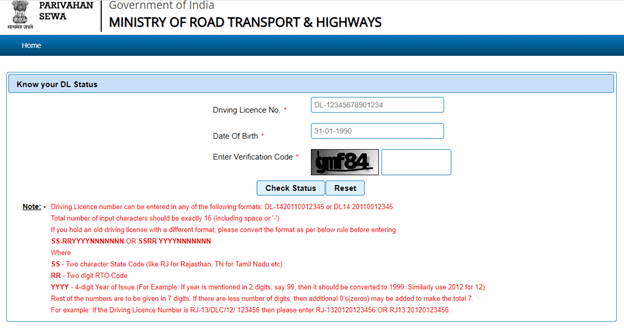
- Go to the official www.parivahan.gov.in website and click on ‘Know your license details’ under the ‘Informational Services’ tab.


- Enter the driving license number as per the given format and date of birth in the fields given. Submit the verification code. Click on ‘Check status’ to view the details including the current status, holder’s name, old/ new DL number, validity details, class of vehicle details, etc.

RTO codes in India and official RTO websites
Parivahan Fancy Number Booking
- Go to the Parivahan Sewa Website. Choose ‘Fancy Number Booking’ under the ‘Online Services’ tab.


- On the next page, click on ‘Search by Number’. Choose your ‘State’ and ‘RTO’ from the dropdown menu.

- Submit the ‘Numeric Part of Number’ and the verification code. Click on ‘Check Availability’. A list of the available registration numbers will be displayed. In case the number is unavailable, you will see a message.
Parivahan Sewa Vehicle Insurance Check
- Go to the official Parivahan Sewa Portal.
- On the homepage, choose ‘Know Your Vehicle Details’ under ‘Informational Services’
- Click on ‘Create Account’ on the ‘Citizen Login’ page.
- Sign in using the mobile number and OTP.
- Choose the state from ‘Select State’ dropdown menu and ‘State RTO’. Click on the ‘Proceed’ button.
- Submit your ‘Vehicle Registration Number’ and captcha code. Click on ‘Vahan Search’.
- You will be able to view the RC status and insurance details of the vehicle on the screen.
Parivahan Sewa: How to apply for fitness certificate online?
- On the home page, click on ‘Vehicle related Services’ under ‘Online Service’.
- Select ‘Vehicle Registration Number’. Submit the vehicle registration number and select the ‘State RTO’ from the dropdown. Click on ‘Proceed’.
- The relevant state transport department page will be displayed.
- Click on ‘Apply for Fitness Renewal/Re-Apply After Fitness Being Failed’.
- Provide details such as ‘Registration Number’, ‘Chassis Number’ (last five characters), and mobile number, and verify the number using OTP. Click on ‘Submit’.
- View the details. Choose the required option for applying for a new fitness certificate or renewal of the fitness certificate. Now, choose an appointment slot at the RTO.
- Select the link for calculating the fees and click on the relevant box for payment online or at the RTO. In case of online payment, the payment gateway page will be displayed. You can download a copy of the payment challan.
Parivahan Sewa: How to apply for Duplicate Fitness Certificate?
- Click on ‘Vehicle related Services’ under ‘Online Service’ on the home page.
- Select ‘Vehicle Registration Number’. Submit the vehicle registration number and select the ‘State RTO’ from the dropdown. Click on ‘Proceed’.
- The relevant state transport department page will be displayed.
- Choose ‘Duplicate Fitness Certificate’. Provide details such as ‘Registration Number’, ‘Chassis Number’ (last five characters), and mobile number, and verify the number using OTP. Click on ‘Submit’.
- Enter ‘Service Details’ and update ‘Insurance Details’. Select an appointment slot at the RTO.
- Select the link for calculating the fees and click on the relevant box for payment online or at the RTO. In the case of online payment, the payment gateway page will be displayed. You can download a copy of the payment challan.
Parivahan Sewa: PUC certificate validity check
The procedure to know the validity of the current PUCC (Pollution Under Control Certificate) through the Parivahan Sewa portal is explained below:
- Go to the Parivahan Sewa Portal. Select the ‘PUCC’ option under the ‘Online Service’ tab.
- On the next page, click on ‘PUC’ certificate.
- Submit the ‘Registration Number’, ‘Chassis Number’ (last five characters) and captcha code. Click on ‘PUC Details’.
- The PUC certificate and validity details will be displayed on the screen
How can I get virtual RC in mParivahan?
- Go to the mParivahan app and click on ‘Add To My Dashboard’
- Submit your DOB. The DL will be added to the dashboard.
- Submit vehicle number for RC.
- Details such as insurance validity, fitness expiry date, etc. will be displayed.
- Click on ‘Add To My Dashboard’ link. Enter the chassis number and the vehicle’s engine number. These details are given in the RC.
- After verification, go to the dashboard and choose the DL or RC you want to show to authorities.
- A QR code will be generated. Authorities will scan this code to verify.
Applicants can check their existing challans and pay online. The RC can be shared with someone, if they are using your vehicle, through the mParivahan for a fixed duration.
Pariwahan Sewa: Forms available on Pariwahan website
- Go to ‘Downloadable forms’ under Informational Services on the portal
- Click on ‘All forms’
- Select the form given under categories – Driving license or vehicles related
Parivahan Sewa: Contact information
Citizens can reach out on the email addresses:
- Vehicle registration, fitness, Tax, Permit, Fancy, Dealer, etc.: helpdesk-vahan@gov.in
- Learner license, driving licence, etc.: helpdesk-sarathi@gov.in
- mParivahan related queries: helpdesk-mparivahan@gov.in
- eChallan related: helpdesk-echallan@gov.in
Parivahan Sewa: Latest news
Update on June 20, 2022
Government introduces new driving licence rules from July 2022
In a recent move that will simplify the process of applying for or renewing the driving licenses, the government has introduced new rules pertaining to driving license in India. The new rules will come into effect from July 1st, 2022 and will be applicable for commercial and personal driving licenses.
As per the New Driving Licence rules that will be implemented by the Union Ministry of Road Transport and Highways, a citizen will not require to give any driving test for 2 wheeler and 4 wheeler by visiting the nearest RTO or Regional Transport Office.
Now, a driving license can be made without a driving test in the RTO. However, one can register at any recognised, private driving school. Once the applicant clears the test, the school will issue a certificate on the basis of which the driving licence will be created. Many private driving schools will be started under the respective state transport have departments or central government.
How to check licence details?
- Visit the official Parivahan website and click on information services
- Then, click on know your licence details
- A new page will be displayed
- Provide your driving licence number, date of birth and verification code
- Click on check status to view the details
How to get registration details?
- Click on information services on the official Parivahan portal.
- Then, click on about registration. The following options will be displayed:
- Temporary Registration
- Permanent registration
- Renewal of RC
- Duplicate RC
- No objection certificate
- Address change
- HP endorsement
- HP termination
- Re Assignment
- Trade certificate
- Issue of duplicate trade certificate
- Diplomatic vehicles
- Ownership transfer
- Registration display
How to get permit details?
- Go to the home page of the official Sarthi Parivahan Sewa portal.
- Click on information services. Then, click on about permits
- A new page appears that will display the permit details
FAQs
What is Sarathi Parivahan?
Sarathi Parivahan is an online portal provided by the Ministry of Road Transport & Highways to digitise Road Transport Offices (RTOs) in India and deliver driving license-related services such as applying for a driving license, DL renewal, etc.
How can I edit my submitted application in parivahan?
Go to vahan.parivahan.gov.in/vahaneservice/ website. Click on ‘DMS Upload/Modify Documents’ option under ‘Other Services’. Enter your application number and click on ‘Submit’. Click on ‘Modify’ option given against the document you wish to edit. Then, click on ‘Choose file’ and ‘Save Changes’ after uploading the new file. Then, click ‘Close’.
How can I download RC from mParivahan?
Go to the mParivahan mobile app on your phone. Click on ‘Add To My Dashboard’ and enter the relevant details. Proceed to get your RC details that can be shared.
Is Digital RC valid in India?
Vehicle owners can have a digital copy of Registration Certificate (RC) and driving license on the Digilocker or mParivahan mobile application. These are considered valid documents, as per Motor Vehicles Act, 1988.
What is RC full form?
RC refers to Registration Certificate of a vehicle, which is the proof of your vehicle registration.
How to apply for a driving licence in Karnataka?
The Parivahan official allows people of Karnataka to apply for a driving licence. Go to the Sarathi Parivahan Karnataka to complete the application process.
| Got any questions or point of view on our article? We would love to hear from you. Write to our Editor-in-Chief Jhumur Ghosh at jhumur.ghosh1@housing.com |