


The Bhulekh MP web portal provides all land-related records to Madhya Pradesh citizens online. Launched by the Revenue Board of Madhya Pradesh, the Madhya Pradesh Bhu Naksha website, also known as Madhya Pradesh Bhulekh, is quite useful for those planning to buy a plot of land or property anywhere in the state. Through this portal, you can get the Bhu map of your property in MP, application form, village list, crop details, classification report of land and the geo map or bhu naksha. Besides the provision to access bhu naksha MP, you can also get all the information about land and property mutation on this web portal.
In this article, we are going to understand how to check the MP bhu naksha of your land on the website.
See also: All about Bhopal property tax
What is MP Bhulekh?
The Revenue Board of Madhya Pradesh (MP) is the authority that maintains the database of land records known as the MP Bhulekh, comprising data on rights of land, land ownership, land records, ownership details, plot maps, land survey numbers, etc. The department also provides an online portal mpbhulekh.gov.in to allow citizens to access land records from their computers.
The MP Bhu-Naksha is a cadastral mapping software developed by the National Informatics Center (NIC), Government of India, aimed at facilitating the digitisation of land records, including cadastral maps. Bhu Naksha (Bhu means land and Naksha means) map, is a large-scale map depicting the boundaries and sub-divisions of land. These maps also show information such as the direction, length and area of tracts. The Bhu Naksha and Bhulekh are crucial documents that help in determining property ownership and used in administrative tasks, including land survey and transfer of ownership.
Services available on MP Bhulekh
The online system of MP Bhu Naksha was developed under the Digital India Land Records Modernisation Programme (DILRMP), which aims to modernise the land records system in the country. Before this development, land records had to be accessed manually by visiting the revenue department’s office.
The MP Bhulekh portal allows property owners and other users to access various services such as:
- Online land records
- Certified copy of land records (Khasra, Khatauni, Bhunaksha)
- Certified copy of scanned reports from report room
- Certified copy of revenue court orders
- Payment of land revenue
- Land use diversion application
- Pending cases in civil court on land
- Details of bail on land
- Mortgage or hypothecation information
In addition to these services, the MP Bhu Naksha portal also provides the following facilities:
- Grievances/complaints: Citizens can use the same portal to lodge their concerns or report issues and seek resolution. For this, they must fill and submit the grievance form, providing relevant details like name, mobile number, email address and a full description of the issue.
- Downloads: The MP Bhulekh portal enables users to download the required land documents easily.
How to check land records online on MP Bhulekh?
- Visit the official MP Bhulekh website at https://mpbhulekh.gov.in/mpbhulekh.do
- On the home page, click on ‘Search’
- On the next page, a list of services will be displayed. Click on ‘Bhu Abhilekh’
- Provide the relevant details such as district, Tehsil, village and khasra number, alongside the Land Parcel Unique ID, ULPIN Number and Land Owner ID.
- Choose from the given options – Landowner, Khasra Number or Plot Number.
- The Bhulekh of the specified district will be displayed on the screen.
How to check Khasra online on MP Bhulekh?’
- Khasra number refers to the land record number allotted by the land revenue officials. To view the khasra online, go to the official MP Bhulekh website and click on ‘Current/Previous Year Khasra’ option given on the home page.


- Provide the relevant details, including Property ID, ULPIN, district, village, and Tehsil


- Click on the landowner tab. Choose owner’s name and submit. The khasra number of the plot will be displayed on the screen.
The website enables property owners to opt for a digitally signed copy of Khasra. They can register as a public user by providing general information and receive the relevant details via email or on their permanent address.
How to download certified land records from MP Bhulekh?
Citizens can use the Bhu Naksha website to download their land records, including Bhu Naksha map.
- To download certified copy of Khasra through MP Bhulekh, Visit MP Bhulekh Khasra Service link. New users must register themselves on the site.
- Registered users can login with their credentials – email ID and OTP.
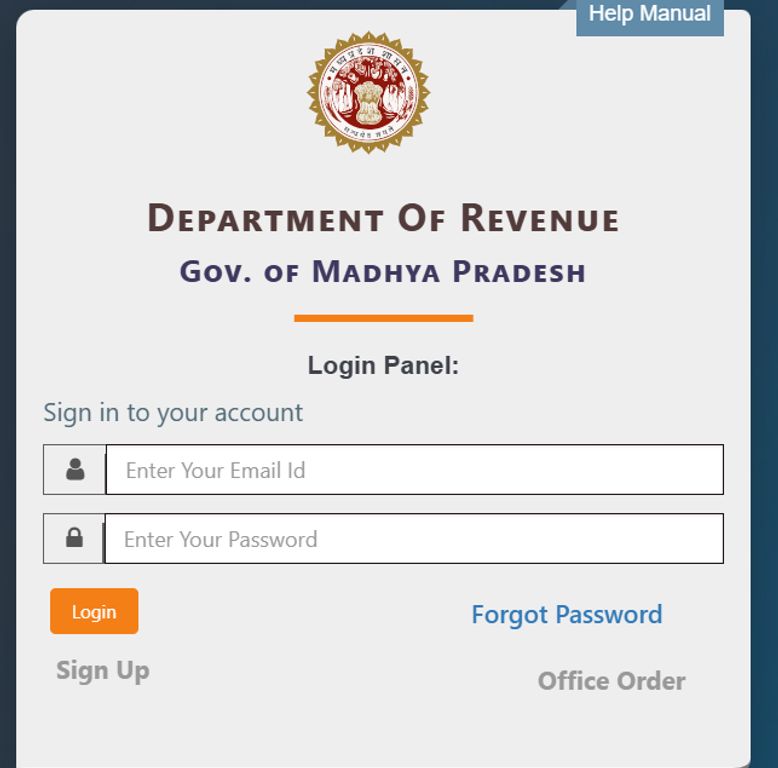

- After logging into the portal, choose the desired district from the dropdown.
- Within the district, select the Tehsil from the dropdown list.
- The selected ‘Tehsil’ will be highlighted and zoomed on the map
- Now, select the village from the list of villages displayed.
- The selected ‘Village’ will be highlighted and zoomed on the map
- Complete the payment procedure. To download the Khasra map user must pay Rs. 5100 per village through MP Online gateway.
- Now, the Khasra will be available for download in the user’s dashboard. The documents will be accessible for two days from the payment date.
How to check plot Bhulekh map?
You can now check the bhulekh map on your computer screen. Like the DLRS in Bihar, MP land records department is responsible for the management of these land-related documents online.
Step 1: To check the bhulekh map in MP, visit Madhya Pradesh’s official online portal called MP Bhulekh at https://mpbhulekh.gov.in/Login.do.
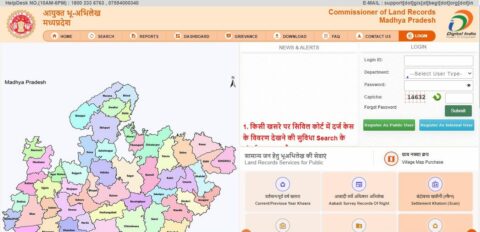

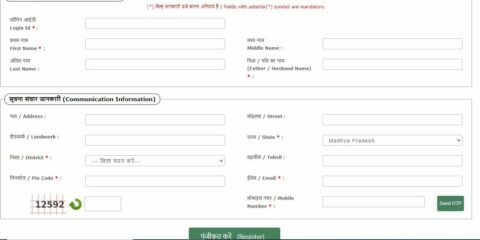
Step 2: Login by entering your details. If you do not have the login information, please click on ‘register as public user’ and enter the details, to create your login id and password.

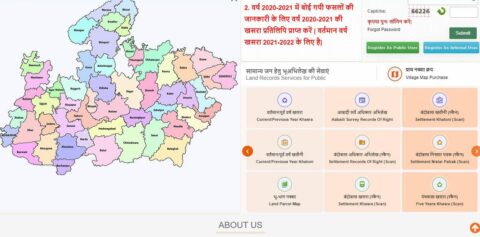
Step 3: Once registered, click on ‘Land Parcel Map’ on the homepage to proceed.

See also: Know about Bhunaksha Rajasthan
You will see a pop-up page with two questions.
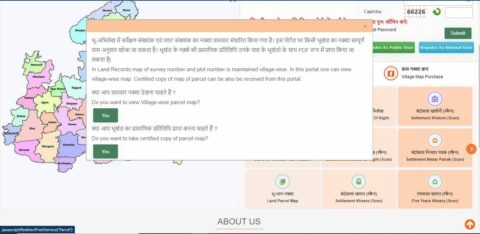

Step 4: On clicking ‘yes’ to the first question – ‘Do you want to view Village-wise parcel map?’ – you will be directed to the https://mpbhulekh.gov.in/mpbhulekh.do page, where you have to enter details of the land, such as zila, tehsil and village.


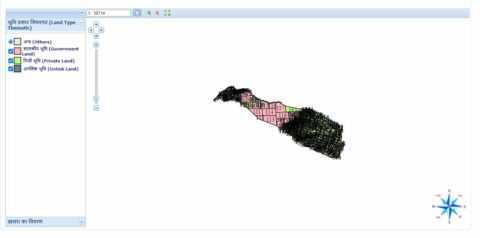
Step 5: Based on your selection, a thematic representation of the MP bhu naksha will be displayed on your screen. The bhulekh map in MP is shown below for one location.

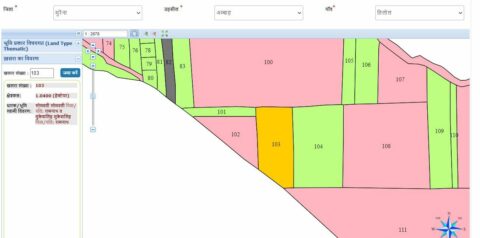
Step 6: To get an MP village map, you can enter the khasra number details for further clarity. When you enter or select a particular khasra, all the details regarding its owner/s, size of the plot and nature of the plot will be displayed.

Step 7: On clicking ‘Yes’ for the second question – ‘Do you want to take certified copy of parcel map?’ – you will get a certified copy of the parcel map that you can take a print out of. Note that for viewing Bhu Naksha in Madhya Pradesh, you do not need to login to the site. However, for taking a certified copy of the parcel map, you have to necessarily login.


See also: Bhu naksha Bihar: How to check Bhulekh land map in Bihar online?
Why should you check plot details?
Checking the plot details on MP bhu naksha portal is important for the following reasons:
Legality
If you are intending to buy a plot of land to construct a house, the MP bhu naksha portal can tell you whether the authorities have permitted construction in the specific plot of land. In case of illegal structures, the authorities have the power to demolish such unauthorised buildings and therefore, it is important to get the permission and details at the earliest.
Owner’s verification
Before the implementation of the Real Estate (Regulation and Development) Act (RERA), frauds pertaining to property were rampant. Obtaining Bhu Naksha and land records enables a plot owner, a seller or a buyer to ascertain their ownership and prevent potential disputes.
Size of the land
Get the exact details of the land/plot through the MP bhu naksha portal. You can know the exact size, location and boundaries of the plot. The bhu naksha or land map details are managed by the department of land records or DLRS in Madhya Pradesh.
Save time
Bhu naksha is not just available in Madhya Pradesh, authorities across the country have taken initiatives to digitise the bhu naksha records. About 22 states have captured data while 19 already have sufficient bhu naksha data online, for easy use by the citizens and land owners. This will help many who may have otherwise decided to visit the government offices. With COVID-19 around, it is better to stay at home and find solutions to all land-related issues, online.
See also: How to check land record in Madhya Pradesh
Alternate way to check Bhu Map in MP
In states like Bihar, the land records department that maintains the bhunaksha is referred to as the Department of Land records and Survery or DLRS. In MP, it is the Land Records division, under the Revenue Department.
Step 1: Log on to http://landrecords.mp.gov.in/ or http://www.mpbhuabhilekh.nic.in/bhunaksha/
Step 2: You can either click on ‘naksha’ on top of the homepage or click on the city wherein the property is located, on the bhu map.


Step 3: You can check bhunaksha for Bhopal, Indore, or any city. When you choose any city, suppose Bhopal, the following message comes up:


Step 4: If you wish to proceed, click on the button provided as shown in the image above.
Step 5: Choose the tehsil and click OK to proceed.


Step 6: You can select the desired option from the drop down menu and type in the code to proceed. Choose Khasra/Naksha to proceed.


Step 7: You will be led to the MP Bhulekh website with the desired result for MP bhunaksha.
Note that if it is a government land, you cannot see the ‘khatauni’. The khasra is as follows. Click on the ‘naksha’ to get the full view.


MP Bhu Naksha on mobile app
The Madhya Pradesh government has also started the MP bhu naksha mobile app service for its citizens. You will also be able to easily access the Khasra, Khatauni details as well. All you need to do is download the MP Land Records- MP Bhu Abhilekh app.


Districts list with MP Bhunaksha records online
| AgarMalwa | Khargone |
| Alirajpur | Mandla |
| Anuppur | Mandsaur |
| Ashok Nagar | Morena |
| Balaghat | Narsinghpur |
| Barwani | Neemuch |
| Betul | Niwari |
| Bhind | Panna |
| Bhopal | Raisen |
| Burhanpur | Rajgarh |
| Chhatarpur | Ratlam |
| Chhindwara | Rewa |
| Damoh | Sagar |
| Datia | Satna |
| Dewas | Sehore |
| Dhar | Seoni |
| Dindori | Shahdol |
| Guna | Shajapur |
| Gwalior | Sheopur |
| Harda | Shivpuri |
| Hoshangabad | Sidhi |
| Indore | Singrouli |
| Jabalpur | Tikamgarh |
| Jhabua | Ujjain |
| Katni | Umaria |
| Khandwa | Vidisha |
For any of the regions mentioned here, you can access and download the bhu naksha from the website.
Know about: Balaghat pin code
MP Bhu Naksha map charges
To obtain a copy of the MPbhu map on an A4-sized paper, the charges are Rs 30 for the first page and Rs 15 for every additional page.
How to report error in MP land records on MP Bhulekh?
Property owners who wish to register their grievances regarding any error and correction of details given in the land records, they can go to the MP Bhulekh website and follow the steps mentioned below:
- Go to the official website and click on the ‘grievance’ tab


- On the next page, provide relevant details such as name of the complainant, mobile number, email id, application type, district, tehsil, village, khasra number, complaint statement, etc. Upload the supporting documents.


- In the next step, complete the OTP verification and proceed to submit your application.
Check out: Balaghat pin code
How to check property-related documents online in MP Bhulekh?
Go to the official MP Bhulekh website. Choose the relevant document from the options given. Property owners can view Khasra/ B-1/ Map copy, and access details related to application form, crop details report, land type report, village list, area related report, Tehsil wise land use summary report, Govt. Khasra report, and so on.
- To check property-related documents, go to ‘Free Services’ tab and choose Khasra, B1, or Map option.
- Submit details such as zilla, village, tehsil, etc.
- Choose the option with the name of the document to be viewed from the list. For example, khata number, khasra number, etc.
- Click on ‘submit’ to get the desired information.
How to check MP Bhu Naksha by name?
The MP Bhulekh website does not provide users with a separate option to check Bhu Naksha by name. However, users can verify the name of the owner using the Khata or Khasra number. For this, the following steps must be followed:
- Go to the MP Bhulekh website https://mpbhulekh.gov.in/mpbhulekh.do
- Click on the Search button and choose the ‘Bhu Naksha’ option
- Provide the relevant details such as Zila, Village, etc.
- The map for the chosen area will be displayed on the screen
- Enter the Khasra number, the owner details will be displayed
Khasra number and MP Bhu Naksha serial number linking
It was not mandatory to link the khasra number with the map number and hence, districts have not linked the two. For it to happen, web-based GIS applications must be linked to other departments, such as the revenue courts, bank and registration departments. In order to share the data with these departments, it is important that all the information should be up to date – that is, the khasra and bhu naksha should be up to date. This has now been made mandatory. All the previous changes that are reflected in the khasra will need to reflect in the MP bhu naksha, as well. Map rectification module, Map number / attribute update, Map number exchange, Map number update and Map clipping / update modules, are now available to facilitate this.
How to track request or transaction status?
Property owners can check the status of transaction or request by visiting the MP Bhulekh website. They can use the ‘Track Status’ option, enter their acknowledgment number and click on Submit to know the status.
MP Bhu Naksha contact information
You can reach the MP Bhu Naksha on the helpline number 18002336763 and 07554000340 between 10 am to 6 pm
Email id: support.gis@begl.org.in
Know about: Gwalior pin code
FAQs
How can I get in touch with Bhu Abhilekh authorities?
You can email your concerns to clrgwa@mp.nic.in
Do I need permission to download bhu naksha of my land in Bhopal?
No, the mobile application and the online website platform make it easy and simple for everyone to access and verify the bhu naksha of the land parcel they intend to buy or enquire about.
Can I download and print the MP bhu naksha?
Yes, bhu naksha can be downloaded and printed. You do not require any permission for this.