Gurugram in Haryana falls under the jurisdiction of the Municipal Corporation of Gurugram (MCG). The Gurugram Metropolitan Development Authority (GMDA) distributes water to the Municipal Corporation Gurugram (MCG), which then distributes water to the sectors that fall under it. Hence, if you are using the water services under the MCG, you are liable to pay your MCG water bill. This is billed as per usage. Check out this guide to know how to pay MCG water bills online and offline in.
MCG Water Tariff details
- To access the MCG Water Tariff details, click on https://wssbilling.mcg.gov.in/Modules/ConsumerOnlinePayment.aspx
- Click on Tariff details to get information. Mentioned below are tariff details for residential-plotted.
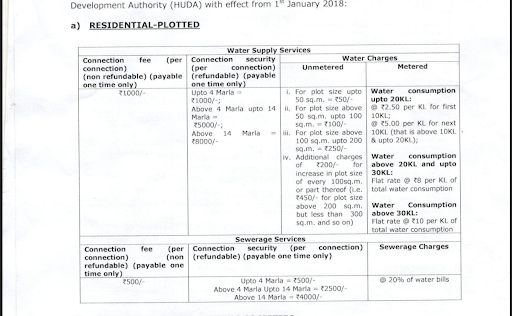
On the page, you will have access to information such as residential group housing societies, institutional, industrial, commercial, bulk supply to Municipal Corporation etc.
What does the MCG Water Bill include?
The water bill includes details such as:
- Water consumption charges
- Water usage in kilolitres
- Sewage charges
- Taxes
- Billing period
- Total bill to pay
- Rebate in any
- Due date
How to get the consumer number of MCG Water Bill?
To access the MCG Water Bill payment service online, you need to know the consumer number. This can be found out in multiple ways:
- Visit the MCG ward office and give details such as registered name, address, mobile number, ID proof etc. to the customer service desk who will find the consumer number registered.
- In case you don’t want to physically visit the ward office, you may call on call centre and check. Keep all details ready that may be used for verification purposes.
- Check the previous water bill as consumer number is always printed on all water bills.
What are the various ways to pay the MCG Water Bill online?
You can pay the MCG Water Bill online through the official MCG portal, through the MCG mobile app, through e-wallets and the various UPI apps. When you use any of the options, payment has to be done through debit card, net banking, UPI, phone wallet or credit card.
How to download Gurugram Water Bill online?
- To download the water bill, log on to the MCG water bill payment online portal.
- Enter the site code and consumer number.
- You will be led to a page that will display the MCG water bill.
- Below the page, you will see ‘download bill’ button. Click on it and you will be able to download the MCG Water Bill in PDF format.
How to pay the MCG Water Bill online through MCG website?
- Log on to MCG Gurgaon Water Bill payment portal on https://wssbilling.mcg.gov.in/Modules/ConsumerOnlinePayment.aspx
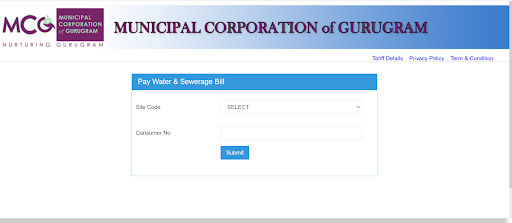
- Select site code from drop down box and enter the consumer number and click on submit. In case you don’t know the site code and the consumer number, you can log on using MCG Gurugram property ID.
- You will see details about the Gurugram Water Bill including your name, registered address, water bill amount, rebate if any, due date by which the bill has to be paid and the fine in case of late payment. Verify the details and click on the ‘make payment’ option.
- Your final bill information will be displayed on the page. Check if your phone number and email id are correct and then select a payment option and proceed with making the water bill payment.
- Once payment is done, you will get an onscreen acknowledgment and you will also get acknowledgements on SMS and email.
How to pay the MCG Water Bill online using MCG mobile app?
- Download and open the MCG Consumer app from the Google Play Store. There is an app supported by Apple also found on the App Store.
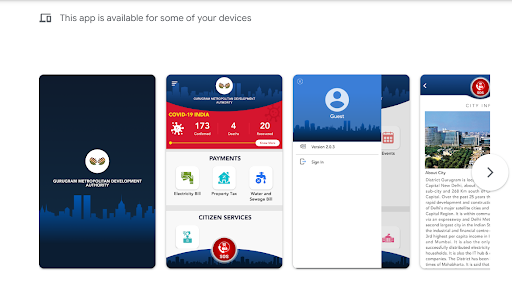
- Fill username and password and log in. If not registered, then first fill details and register yourself on the app.
- Next, log on to the water bill payment page.
- View the bill, select payment mode and proceed to make the payment.
- Once payment is done, you will get the receipt that you can save for future use.
How to download MCG Water Bill receipt?
- Once you log on to the MCG Water Bill Portal and enter your site code and consumer number, you will be able to see the water bill details.
- A section called payment details will include all details regarding your past transactions.
- You can identify the receipt that you want to download from this lot and click on download.
How to pay the Gurugram Water Bill offline?
- To pay the Gurugram Water Bill offline, visit the MCG ward office in your locality along with the water bill.
- Show ID proof and give details such as name, registered number and id proof.
- You can make payment by credit card, debit card, cash, cheque or demand draft.
- Once payment is made, collect the receipt.
What is the penalty for late payment of MCG Water Bill?
The late payment charges are levied at 10% per month or part thereof shall be applicable.
How to get a new MCG water connection in Gurgaon?
To get a new water connection, follow these steps.
- Log on to the MCG website.
- Register yourself on the website and log in using username and password.
- Click on apply for new water and sewerage connection.
- Enter all details asked and attach supporting documents.
- An MCG official will get in touch with you for the new water connection.
What are the disconnection charges for existing water connection?
-
- Disconnection on receipt of request (in writing) from the consumer: Rs 200 per connection.
- Disconnection from service line due to non-payment of dues: Rs 100 per connection.
- Disconnection from ferrule: Rs 1000 per connection.
Conditions related to water tariff for areas under HUDA
- In respect of released areas/land, falling within HUDA Sectors/Areas, the water supply / sewerage/ storm water drainage facilities shall be given only after recovering complete external development charges and internal development charges, as worked out by HUDA, in advance. The regular monthly charges, connection fee and other charges shall be same as in being charged to the plot holders in the areas developed by HUDA for the respective categories.
- No charges shall be levied in respect of public stand posts in villages.
- For all types of premises, water shall be supplied only upto the underground tank of the premises (irrespective of its type of usage).
- In case the meter goes out of order, it shall be the responsibility of the consumer to get the meter back in order by way of submitting application to the competent authority. The date of issue of notice in this regard shall be treated as the date of meter going “out of order”.
- If the meter remains out of order for more than 2 months from the date of issue of notice to the consumer, water supply shall be considered as “unmetered” and charges shall be levied accordingly. In case of premises where unmetered supply is not allowed, the water supply shall be disconnected.
- Installation of boosting pumps direct online shall not be allowed. If detected, a penalty of Rs 10,000/- shall be imposed every time, in addition to forfeiture of installed boosting pump.
MCG water bill grievance redressal
To file a complaint against issues regarding water bill MCG or supply of water follow these steps.
- Log on to https://wssbilling.mcg.gov.in/grievance.aspx
- Fill details of name, mobile number, email and subject of the complaint and type in your complaint.
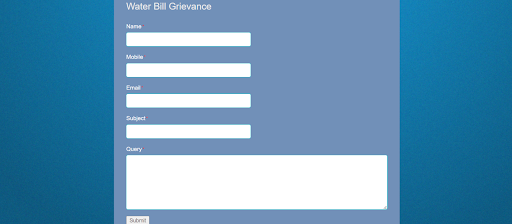
- Click on the submit button.
- You will get acknowledgement through SMS and email.
- You can track the status of the complaint using the reference provided on the acknowledgement.
- You can also register your complaint through toll-free number at 18001801817 or email at watersupport@mcg.gov.in
Housing.com POV
The water bill payment to Municipal Corporation Gurugram is mandatory and this has been made easy with the help of online and app based facilities. An added advantage of opting for online based payments is that it keeps track of your MCG water bill payments. In addition to paying using UPI, e-wallet, debit card and net banking, you can also pay the water bill MCG through your credit card. This will help manage or segregate your finances, build credit score and avail of reward points that you earn from the transaction.
| Got any questions or point of view on our article? We would love to hear from you. Write to our Editor-in-Chief Jhumur Ghosh at jhumur.ghosh1@housing.com |